
Why New Outlook Can't Drag Files to Other Apps
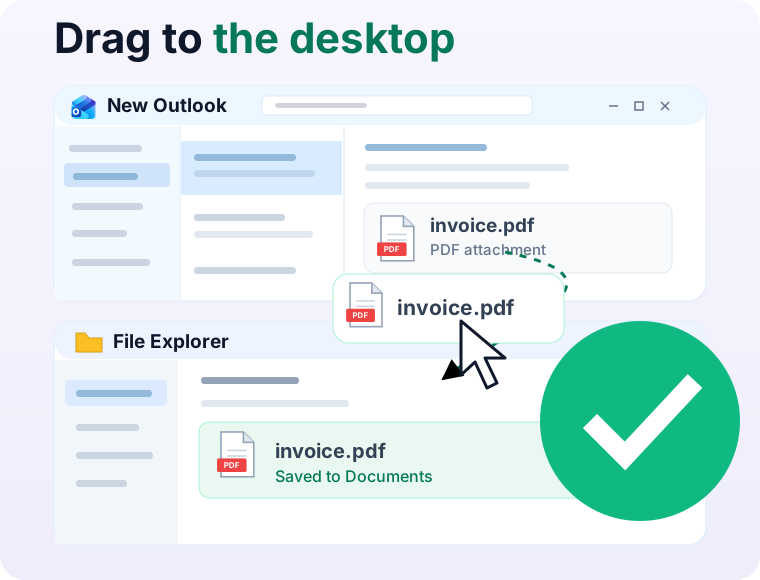
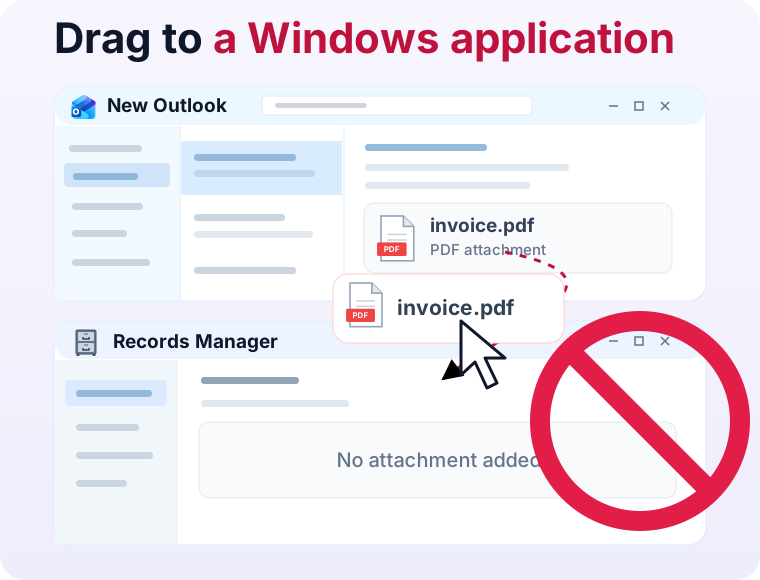
If you’ve tried dragging an email or attachment from new Outlook into another application and watched nothing happen, you’re not alone.
New Outlook is set to replace Microsoft’s long-established Outlook email client. Yet it only lets you drag emails and attachments to the desktop, not to most other applications.
Drag and drop has been a basic expectation of desktop software since at least the release of the Apple Lisa over 40 years ago, and this is a significant step backward.
In recent discussions across Reddit, LinkedIn, and the Microsoft Tech Community, classic Outlook users described what was keeping them from switching to new Outlook. A roundup of their responses put attachments and drag-and-drop workflows at the top of the list.
Microsoft added support for dragging emails and attachments to the desktop in May 2024. Why just the desktop? Why not other applications? The short answer: new Outlook runs inside a browser engine that can only drag files to the few apps that support an optional async protocol. The rest of this article traces exactly how that works and how it might be fixed.
Drag and Drop on Windows
On Windows, drag and drop between applications uses Windows OLE, a set of APIs for sharing data between applications. Its core interfaces date back to Windows 3.1 and are still used today.
Drag Source
A drag starts when the user presses a mouse button over a draggable object and moves the mouse. The source window receives a WM_LBUTTONDOWN message for the button press, followed by WM_MOUSEMOVE as the mouse moves.
When the mouse moves far enough, the source application calls the OLE DoDragDrop function. The source passes two objects to DoDragDrop:
IDataObject, used to supply the data the dragged object represents, in various data formats, andIDropSource, used to receive updates about the state of the drag, give visual feedback to the user, and control when it should complete or cancel.
The call to DoDragDrop starts a nested message handling loop that lasts for the duration of the drag, typically until the user releases the mouse button or presses the Escape key.
Drop Target
An application acts as a drop target by calling RegisterDragDrop with a window handle and an IDropTarget object. After that, the IDropTarget will receive DragEnter, DragOver, DragLeave, and Drop callbacks whenever a drag interacts with the registered window.
The DragEnter and Drop callbacks are passed a pointer to the IDataObject provided by the drag source. The target calls IDataObject::GetData to request the data in a particular format, such as text, images, or files.
Dragging Files
The most common way to transfer files is through the CF_HDROP format, which supplies a list of filesystem paths. The drop target can then open those files to read their contents.
A source can also offer “virtual files”: names and metadata through CFSTR_FILEDESCRIPTOR and contents through CFSTR_FILECONTENTS. This allows the source to provide a file without requiring it be accessible through a filesystem path. Not all applications that accept file paths through CF_HDROP also support these virtual file formats.
In short, there are two ways to pass a file to another app through drag and drop: give it a file path, or stream the file’s contents directly. Most apps only support the first approach.
Drag and Drop on the Web
The HTML Drag and Drop API lets a web page make an element draggable by giving it a draggable="true" attribute. When the user starts dragging it, the element’s dragstart event handler runs and adds data of various formats to event.dataTransfer. For example:
<p id="drag-source" draggable="true">Drag this text</p>
const dragSource = document.getElementById('drag-source');
dragSource.addEventListener('dragstart', (event) => {
  event.dataTransfer.setData('text/plain', dragSource.textContent);
});
Text supplied this way can be dropped into any application that accepts text drops. Chromium-based browsers like Chrome and Edge also support dragging files through a data format called DownloadURL, in the form <type>:<name>:<url>:
dragSource.addEventListener('dragstart', (event) => {
  event.dataTransfer.setData(
    'DownloadURL',
    'application/pdf:report.pdf:https://magicdragin.app/report.pdf'
  );
});
When the DownloadURL format is set, the browser sets up an IDataObject that supports the CF_HDROP format. When a compatible drop target requests the CF_HDROP format, the file is downloaded on demand to a temporary location and the file path is returned to the drop target. This mechanism only supports dragging a single file.
This feature was originally added to Chromium in 2010 to support dragging attachments from Gmail to the desktop. It’s since been adopted by many other web apps, though it isn’t a standard web API (i.e. it doesn’t work in Firefox, Safari, etc.).
Sync vs. Async Data Extraction
Sync Extraction
Downloading files on demand can take time. Most drop targets handle the IDropTarget::Drop callback synchronously on their main user interface thread. They call IDataObject::GetData and wait for the data before returning. If that call waits for a download, the target app can’t respond to mouse or keyboard input and appears hung.
Async Extraction
Windows has an optional mechanism to allow the drop target to extract the data on a background thread: IDataObjectAsyncCapability. Both the source and target must support it.
The steps are:
- The drag source advertises that it supports async extraction by passing
DoDragDropanIDataObjectimplementingIDataObjectAsyncCapabilitywith aGetAsyncModemethod that returnstrue. - In
IDropTarget::Drop, the target checks whether the source supports async extraction. If so, it callsIDataObjectAsyncCapability::StartOperationto notify the source that extraction is starting and arranges a background thread to retrieve the data. IDropTarget::Dropreturns on the target side and thenDoDragDropreturns on the source side.- The drop target extracts the data through
IDataObject::GetDataon a background thread. - When finished, the target calls
IDataObjectAsyncCapability::EndOperation, signaling to the source that it is done and the data can be cleaned up.
Here, “async” means that IDropTarget::Drop can return without waiting for data extraction to finish. IDataObject::GetData is still a synchronous method; it doesn’t return a JavaScript-style promise.
Because an on-demand download using the DownloadURL format could hang the target application, Chromium requires the target to support async extraction. Otherwise Chromium’s IDataObject::GetData method returns an error instead of downloading the file. Here’s the relevant logic for files downloaded on demand, simplified from the Chromium source:
HRESULT DataObjectImpl::GetData(FORMATETC* format, STGMEDIUM* output) {
  if (dataAlreadyAvailable)
    return CopyStoredData(output);

  if (inDragLoop)
    return DV_E_FORMATETC;

  if (!asyncOperationStarted)
    return DV_E_FORMATETC;

  if (!DownloadAndWait())
    return DV_E_FORMATETC;

  return CopyStoredData(output);
}
In plain terms: if the target app hasn't opted into the async protocol, Chromium returns an error instead of downloading the file. The drag silently fails.
Unfortunately, very few applications support async extraction, mostly just Windows Explorer and many third-party Explorer replacements. For other potential drop targets, including native apps and web apps, dragging files this way doesn’t work.
This issue was first reported to Chromium’s issue tracker in 2015 in CF_HDROP implementation prevents drops to most Windows applications, but was closed as Won’t Fix in 2020 due to inactivity. A Chromium maintainer acknowledged the issue:
If the client does not indicate it is performing an async drop, Chrome refuses to fill the
CF_HDROPparameter in the hopes of preventing the client application from hanging while a download operation occurs on what is presumed to be a UI thread.
Drag and Drop in New Outlook
New Outlook is built with web technology shared with Outlook on the web, running inside Edge WebView2 — essentially Edge's Chromium-based browser engine embedded in a desktop app. Looking at its JavaScript code, I can see that it uses the DownloadURL format for email and attachment drags, meaning it inherits Chromium’s limitation: the target must implement async extraction for these file drops to work.
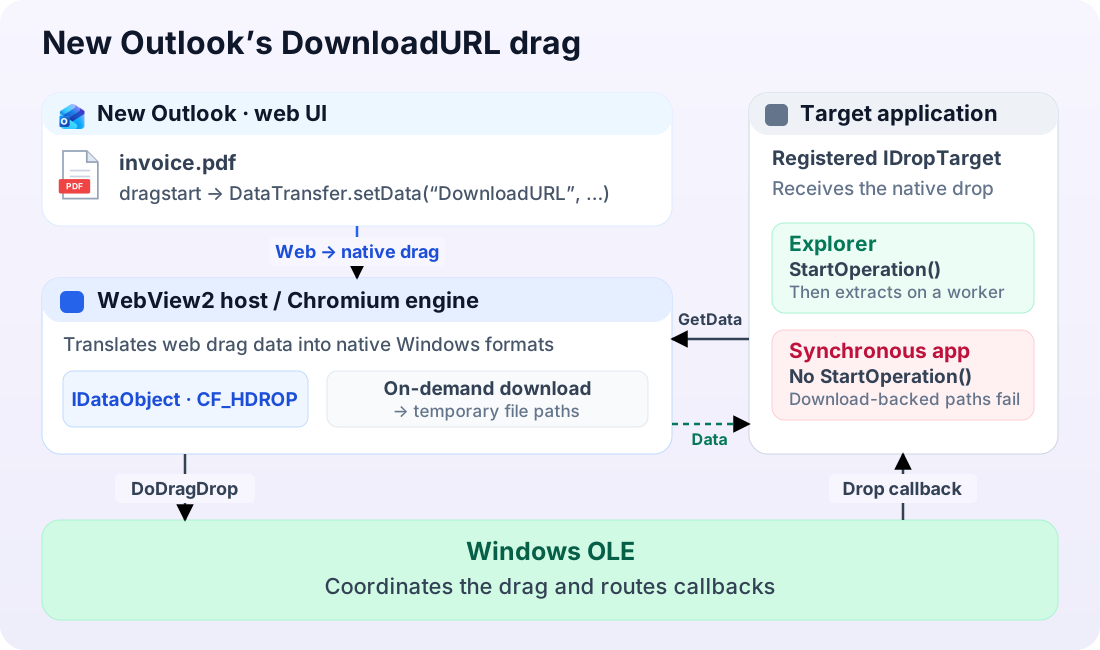
Below is simplified code from new Outlook that runs when a user starts dragging an attachment. It sets a DownloadURL and optionally adds the file’s cached contents as a JavaScript File (original bundle):
if (featureEnabled("mon-dnd-download")) {
  dataTransfer.setData(
    "DownloadURL",
    [mimeType, fileName, downloadUrl].join(":")
  );

  if (featureEnabled("mon-dnd-file-bytes") && cachedBytes) {
    const file = new File([cachedBytes], fileName, { type: mimeType });
    dataTransfer.items.add(file);
  }
}
Below is simplified code for dragging emails. A separate feature flag controls whether the drag includes one email or multiple (original bundle):
if (featureEnabled("mon-dnd-download")) {
  const multiple = featureEnabled("mon-dnd-download-multiitem");
  dataTransfer.setData(
    "DownloadURL",
    multiple ? JSON.stringify(downloadUrls) : downloadUrls[0]
  );
}
A few things stand out in these code snippets and Outlook’s feature-flag definitions:
mon-dnd-downloadcontrols whether dragging files is allowed. For the versions I inspected, it’s set in new Outlook but not in Outlook on the web. I believe Microsoft could make it work in Outlook on the web in Chromium browsers by enabling this feature there, but currently doesn’t.mon-dnd-download-multiitemadds multiple download URLs into the drag data. This might be in place to eventually take advantage of an in-progress Chromium change introducing a newDownloadURL-listformat to allow dragging multiple files (see high-level explainer and detailed design).mon-dnd-file-bytesadds a JavaScriptFileobject (see Mozilla documentation) to attachment drags. This is likely preparation for a related Chromium change to better supportFileobjects in drag and drop (see high-level explainer and detailed design).
How could Microsoft fix this?
According to Microsoft’s Feature comparison between new Outlook and classic Outlook, support for dragging files to other applications is “upcoming”, but there’s no corresponding entry in the Microsoft 365 roadmap with a release date or other details.
Based on Outlook’s existing code and the work underway in Chromium, here are two ways Microsoft might approach it:
Prefetched web drag
New Outlook already has code for adding JavaScript File objects to attachment drags, but it relies on an in-progress Chromium change. The design for that change explicitly states:
The goal of this design is to close that gap by supporting a new scenario: dragging a JavaScript
Fileobject out of the browser and dropping it onto a native application.
Notably, this Chromium change is being designed and implemented by a Microsoft engineer on the Outlook team (joone) — a strong signal that fixing drag and drop in new Outlook is at least part of the motivation.
With the file’s contents already available in the File objects, Chromium could supply them through the Windows virtual file formats CFSTR_FILEDESCRIPTOR/CFSTR_FILECONTENTS without downloading during the drop.
This approach has two limitations:
-
It requires the file’s contents to be available when the drag starts.
The JavaScript code I inspected prefetches attachments up to 10 MB when a message is displayed. It also prefetches emails up to 5 MB when the user hovers the mouse over them.
This could cover many drags, but wouldn’t work for large files or files that haven’t finished downloading by the time a drag starts.
-
It only supplies virtual files, meaning target applications must support the
CFSTR_FILEDESCRIPTOR/CFSTR_FILECONTENTSdata formats; supportingCF_HDROPalone isn’t enough.Chromium does support those formats, so this would at least support drops into web apps in Chromium-based browsers. However, many native line-of-business apps wouldn’t be supported.
Application-owned native drag
Alternatively, new Outlook could delegate the drag to a native helper that provides its own IDataObject and calls DoDragDrop. WebView2’s DragStarting override API could be used for this.
This helper could download files on demand and return their temporary file paths through CF_HDROP, like Chromium does for DownloadURL drags. But unlike Chromium, it could also allow targets that don’t support async extraction.
This solution has its own disadvantages:
- The target app would be unresponsive while the file downloads. New Outlook would need to provide progress feedback and a way to cancel.
- This wouldn’t work in Outlook on the web, whereas a completely web-based solution would.
Wrapping up
New Outlook’s drag-and-drop limitation comes down to running a desktop app on a browser engine that wasn’t built to support dragging files to most other applications. Outlook’s code and ongoing Chromium work both point to a fix being underway, but there’s no public timeline.
Until then, the workaround is saving to the desktop first or using a third-party tool that can translate web drags into native file drops.